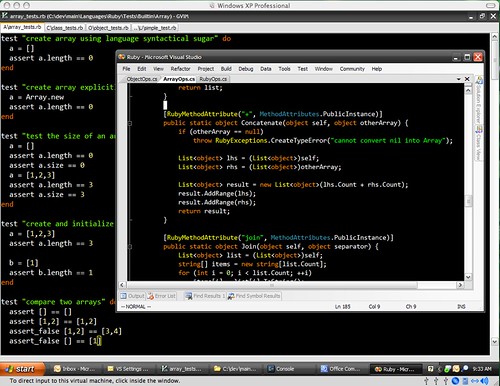
I’m a big fan of the Vibrant Ink theme for Textmate. I spent some time last year porting the color scheme to both vim and Visual Studio - that’s what you can see in the screenshot. I’m releasing my _vimrc and vssettings files if you want to experiment with this stuff in your local configuration.
I also use ViEmu in Visual Studio so that I can use the same keybindings everywhere. This is especially important if you’re doing Windows development on a Macbook Pro since there are missing keys - and the key chords that you have to use daily on a MBP to achieve equivalent functionality to a standard PC keyboard are annoying at best, or will lead to RSI at worst.
You may notice an inconsistency between my vim and VS settings. I was a two-space indent guy before coming to the company, but everyone else around here has a thing for four-space (not tab- yay!) ident, so I caved.
Update: I’m an even bigger fan of Fusion now, since the crazy race condition problem for grabbing a wireless network connection here on corpnet seems to be gone. This problem manifests itself when I suspend my MBP by closing its lid. When I open the lid, both the Mac OS and Windows machines try to grab their own wireless connection on corpnet (I cannot use NAT). Under Parallels, this would result in my laptop getting booted off corpnet (maybe 50% of the time) until I shut down Parallels, waited until my host OS got a connection to corpnet, and then restarted Parallels. This wasted a ton of time, and resulted in me walking around a lot with the lid open …
32 archived reader comments
Chris Ortman (2007-06-15)
Have you seen vividchalk for vim? http://vim.sourceforge.net/scripts/script.php?script_id=1891
Mike Sax (2007-06-15)
Thanks for sharing John! What XP theme do you use?
Tomas Restrepo (2007-06-15)
That’s a pretty nice style, John. I find it a bit “too vibrant” for me, but pretty good still :)
I had heard about VIMEmu but for some reason I had not bothered to try it… maybe I will soon!
Josh Charles (2007-06-15)
Thanks! Got it up and working on my version of Visual Studio - This is great!
Nick Parker (2007-06-16)
Thanks John, much appreciated.
Kevin Williams (2007-06-16)
So sweet - thanks! The contrast seems a bit too high, but having a VibrantInk look-alike in Visual Studio is great!
M. David Peterson (2007-06-17)
@Mike Sax,
If not mistaken, that’s the Zune theme. You can download it from go.microsoft.com/fwlink/?LinkID=75078
Jo Vermeulen (2007-06-25)
Hello John,
I created a .vim colorscheme based on your initial work:
http://blog.jozilla.net/2006/10/5/vibrantink-theme-for-vim
http://www.vim.org/scripts/script.php?script_id=1794
Maybe it’s good to team up and integrate both our work into one colorscheme?
Mark Kruger (2007-07-24)
I am a little late to comment, but what is it about Vibrant Ink that is appealing?
Is it aesthetics alone or does it help with reading and understanding the code in some way?
Dan (2007-08-02)
Great work John, looks even better when you set the font to: “Lucida Sans Typewriter”
Sandro M. (2007-11-06)
John, thank you very much for your fantastic job. I have just announced your theme on my blog! Good work!
Mike (2008-11-03)
Thank you very much.
Afshin Zavar (2008-11-13)
What’s your windows skin? and which software do u use?
PHenry (2009-02-12)
I noticed you mentioned the diff between spaces and tabs. I’ve always used tabs but recently move to a company using spaces (2). Seems more personal preference, or Unix vs Windows?
What’s your pros/cons of using either/or?
I can’t seem to hit the right google search phrase today. Thanks.
DJ (2009-02-24)
Very nice - but I can’t get NAntAddin to appear when I’ve got these setting imported. Anyone else have that issue?
Ram (2009-03-09)
Cool Theme. Thanks a lot for sharing !!!
Aaron S. (2009-03-09)
If you use TAB instead of space, it allows the user to set how to represent that indentation.
Say you like the 2 char indent and I like 4. If we both keep TABs, then the source is the same, just our individual IDE’s know how to draw them to our liking.
If we each replace tab with spaces, every time I reformat source you created, the entire source appears to have changed.
Why does anyone use spaces?
Dutt (2009-06-03)
This is excellent theme than anyone else.
but Ctrl+F, Search box is not working. Dialog Box is not displying.
B (2009-08-14)
Thanks a lot, I love this theme!
Signs on the Sand (2007-06-18)
Vibrant Ink Theme for Visual Studio
John Lam ported Textmate’s Vibrant Ink theme to Visual Studio. Get it here. Awesome. Note that toolbarbuttons are nowhere to be seen. I noticed that while I’monly barely use toolbar, it still takes lots of space and more irritating- d…
Console.Write(this.Opinion) (2007-06-19)
Mudando o visual do Visual Studio
Mudando o visual do Visual Studio
Rob Conery (2007-08-14)
Rails-y TextMate Theme For Visual Studio
Rails-y TextMate Theme For Visual Studio
Bite my bytes (2007-09-02)
Links of the week #1 (week 35/07)
Links of the week #1 (week 35/07)
CodeClimber (2007-10-12)
Pimping my Visual Studio
Pimping my Visual Studio
JrzyShr Dev Guy (2007-10-23)
Vibrant Ink in Visual Studio
If you do any Silverlight development, you’ll likely end up spending a good deal of time switching between
CodeClimber (2007-12-04)
My definitive color VS color schema
My definitive color VS color schema
Scott Hanselman’s Computer Zen (2008-02-07)
Visual Studio Programmer Themes Gallery
SergioTarrillo’s RichWeblog (2008-04-01)
Coleccion de temas para Visual Studio 2008
Alguna vez leí en un artículo de Internet que un leer sobre un fondo negro cansa menos que leer sobre
Tecnocrata (2008-10-25)
Protege tus ojos con temas de Visual Studio
La mayor parte del tiempo que la paso frente al monitor de mi computadora, ya sea en mi trabajo o en
¿Sueña el algoritmo con ovejas eléctricas? : “Temas” para Visual Studio (2010/07/09)
[…] http://iunknown.com/2007/06/vibrant-ink-visual-studio-and-vim-settings.html […]
Curso Web 2.0 » Blog Archive » La Bloguera 9 July 2010 (2010/07/09)
[…] http://weblogs.asp.net/infinitiesloop/archive/2006/08/06/Join-the-Dark-Side-of-Visual-Studio.aspx http://iunknown.com/2007/06/vibrant-ink-visual-studio-and-vim-settings.html Pero de todos los sitios que he encontrado el que posiblemente sea el más interesante es el […]
Shaunt (2010/11/23)
This is an awesome theme. Love the colors, fonts, and just about everything.
The only problem I’m seeing so far is if I have a string like this using a literal …
string template = @" abc this is a test test "
it uses an ugly dark red color instead of the nice green. Is this visual studio not recognizing that this is a string? or something missing from the Template?